
At a glance
- You can order a part designed by an AI the same way as any other part. We quote from a STEP file, whoever drew it.
- The dependable recipe: ask the AI to write CAD as code (CadQuery or build123d), export a STEP file, and check it against our published manufacturing rules.
- Connect your agent to our MCP server at
https://api.rmfg.com/mcp. It uploads the file, runs the manufacturability check, prices it, and hands you one checkout link. No account or API key is needed to quote. - No agent? Drop the STEP file on the quote page. You get the same check and the same price.
- The AI never pays. You review the cart and pay on rmfg.com.
What an AI-designed part is
An AI-designed part is one where a language model did the CAD work. You describe what you need, such as "a bracket that holds a NEMA 17 stepper motor," and the model produces the geometry.
The models are good at this when they write CAD as code. A short Python script in CadQuery or build123d describes the part with real dimensions and exports a STEP file. The script is easy to read, easy to change, and repeatable: change one number and export again.
A STEP file is what a fabricator needs. It holds exact faces, edges, and holes, so we can find the thickness, unfold the bends, and measure every hole. Mesh formats such as STL are fine for 3D printing, but they describe a surface as triangles and lose that information. For sheet metal, ask for STEP.
What the AI does not know by default is what a particular shop can make: which thicknesses are in stock, how tight a bend can be, how close a hole can sit to a bend. That is the gap this guide closes.
The workflow
There are six steps between an idea and an order. An agent connected to RMFG can do all of them in one conversation. You approve the decisions and pay.
- 01Prompt
Describe the part and point the AI at RMFG's manufacturing rules.
- 02STEP file
The AI writes CAD as code and exports a STEP file.
- 03Upload
Your agent uploads it over MCP, or you drop it on the quote page.
- 04DFM check
Every part, hole, and bend is checked against the real tooling.
- 05Price
An instant price for your material, finish, and quantities.
- 06Checkout
One link. You review the cart and pay on rmfg.com.
The rest of this guide walks through one real part, start to finish. We ran it ourselves: an AI agent (Claude) wrote the CAD, and the same agent used our MCP server to check and quote it. The findings, prices, and screenshots are what the tools returned.
Step 1: Describe the part and give the AI our rules
Start with what the part has to do, the material, and the fasteners. Then add one line that matters more than any other: tell the AI to read our manufacturing rules before it models anything.
Design a sheet metal mount for a NEMA 17 stepper motor that I can order from RMFG (rmfg.com).

Before you model anything, read https://www.rmfg.com/docs/manufacturing-rules.txt and follow its limits for the stock you choose.

Requirements:
- One part with one 90° bend, in 5052-H32 aluminum, 0.125 in thick.
- Motor face: a 22.5 mm pilot bore and four M3 clearance holes on the 31 mm NEMA 17 pattern.
- Base flange: two slots for M5 screws, so I can slide the mount to tension a belt.
- Keep it compact, about 60 mm wide.

Write it as a CadQuery script with every dimension as a named variable at the top. Model constant-thickness sheet with the inside bend radius RMFG forms in this stock. Name the part, export motor-mount.step, and tell me the overall size and how far each hole is from the bend.
The manufacturing rules are a plain-text file an agent can read with no account. We generate it from the checks our quote runs and from the live catalogs, so it lists the real stock thicknesses, the inside radius our tooling forms in each one, minimum flanges, finish limits, and hardware. These are the rules that catch AI designs most often:
| Rule | Limit |
|---|---|
| File | STEP or STP, up to 50 MB |
| Flat size | The unfolded blank fits within 1524 × 1206.5 mm (60 × 47.5 in) |
| Small features | Holes and slots at least half the material thickness wide |
| Holes near bends | Hole edge at least 2 × thickness + the inside bend radius from where the bend starts |
| Bend angle | Up to 120° under 2.54 mm thick, up to 95° at 2.54 mm and thicker |
| Flange length | Depends on the stock. It is 9.6 mm for the 0.125 in aluminum in this guide |
| Powder coating | A hanging hole at least 2.2 mm across. Steel and stainless at least 0.060 in thick, aluminum at least 0.080 in |
These were the limits when we wrote this. The rules file always has the current ones, so point the AI there instead of pasting numbers into your prompt.
Step 2: Get a STEP file
The AI answers with a script. Ours is about 40 lines. The dimensions sit at the top as named variables, which is what makes the fix in step 5 a two-number change.
import cadquery as cq

T = 3.175       # stock thickness
R = 2.4         # inside bend radius RMFG forms in this stock
WIDTH = 60.0    # along the bend line
BASE = 45.0     # base flange, measured from the outside of the bend
HEIGHT = 56.0   # motor face (first draft: 48)
MOTOR_Z = 33.0  # shaft height above the base (first draft: 26)

# ...an L-shaped profile with the bend radius, extruded to WIDTH...
# ...a pilot bore, four M3 holes, and two M5 slots cut through it...

cq.Assembly(part, name="motor-mount").export("motor-mount.step")
Download the full CadQuery script and the STEP file it exports. You can quote that file yourself.
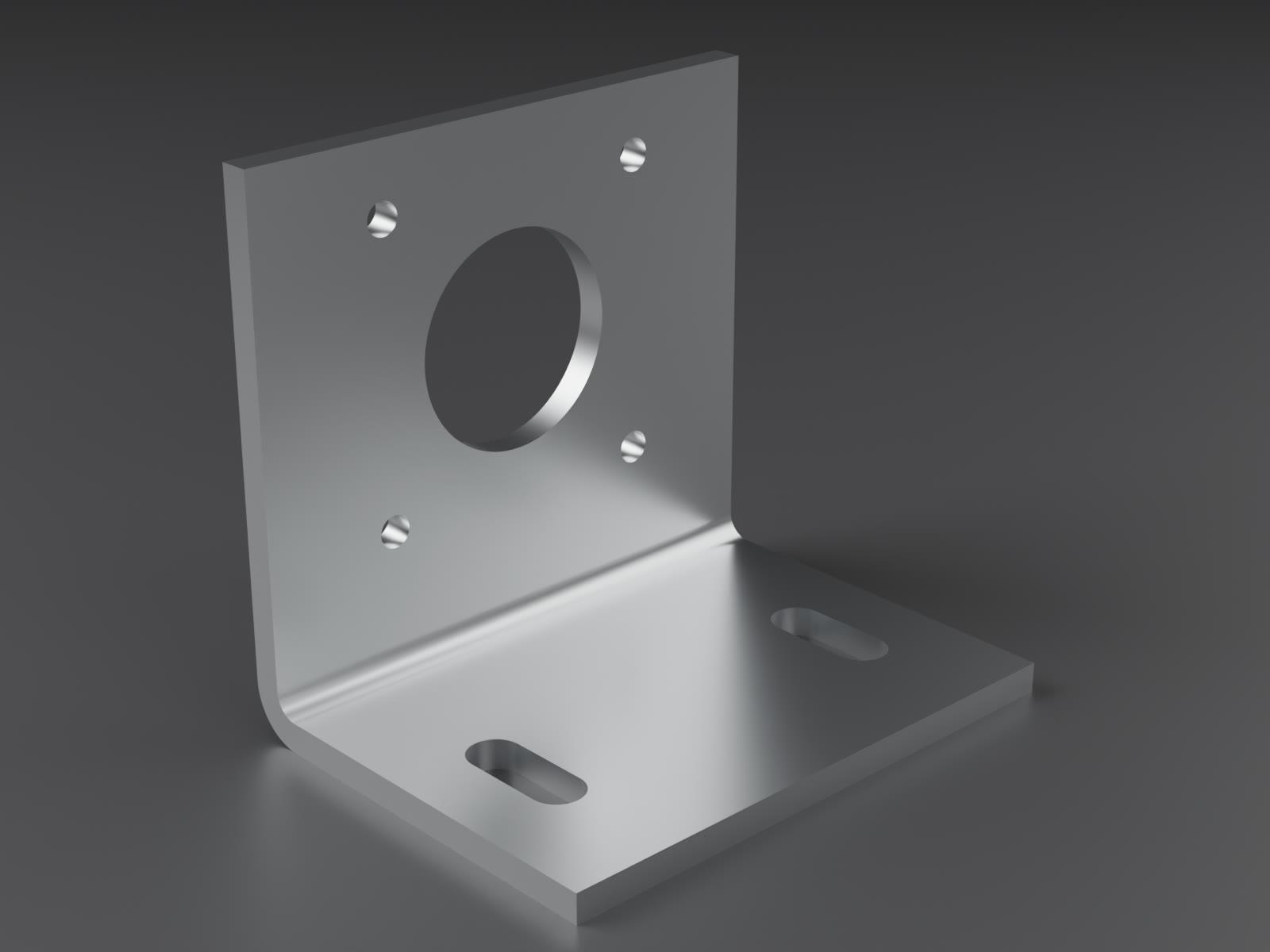
Three habits make AI-written CAD easier to order:
- Model the finished shape. Draw the part bent, at one constant thickness, with a radius on the inside of each bend. We unfold it for you.
- Use a stocked thickness. 0.125 in is stocked in 5052 aluminum. "3 mm" is not. The materials catalog and the rules file list every thickness.
- Name the part. Without a name, our exporter labeled the part "Open CASCADE STEP translator 7.9 1" in the quote. One argument fixed it.
Step 3: Connect your agent to RMFG
Add our MCP server to your AI client. It is one URL, with nothing to install and no sign-in to quote.
https://api.rmfg.com/mcpclaude mcp add --transport http --scope user rmfg https://api.rmfg.com/mcp
# Then run /mcp inside Claude Code and choose rmfg to sign in.codex mcp add rmfg --url https://api.rmfg.com/mcp
codex mcp login rmfgSet yourself up to quote custom sheet metal from RMFG without asking me to sign in.
1. Add the remote MCP server "rmfg" at https://api.rmfg.com/mcp (Streamable HTTP) with no Authorization header. Setup: https://www.rmfg.com/docs/api/mcp
2. Call begin_project. Keep the key private.
3. Call get_agent_guidance and follow it. Quote the part, then create_checkout. Give me cart_url and no other link. I review the cart, sign in and pay there. Do not start OAuth. Do not say an order was placed until get_checkout shows an order_id.
4. Ask me for a STEP file and what I need made.Claude, ChatGPT, Cursor, and VS Code each take the same URL in their connector settings. The MCP setup page has the steps for every client.
Once connected, the agent has tools to upload a design, inspect its parts, search our catalogs, quote, price delivery, and prepare a checkout. It also gets our agent guide, which sets the ground rules: report every finding, never swap a material or finish without asking, and never call a quote an order.
Step 4: Ask for a quote
Tell the agent what you want made and how many. Ask for more than one quantity. It costs nothing and shows you the price break.
Use RMFG to quote motor-mount.step.

I want 4 pieces in 5052 aluminum, 1/8 in thick, deburred. Also show me the price at 10 and 25 pieces.

Show me every manufacturing finding and anything that needs my decision. Do not change the material, thickness, or finish without asking me. I'm shipping to Austin, TX 78701.
To show what the check catches, we gave it an earlier draft of the bracket. That draft was drawn more compact, with the motor 7 mm lower, and was never checked against the rules. Here is what came back. The agent's replies are condensed. The numbers are the ones the tools returned.
I uploaded motor-mount.step. RMFG reads it as one sheet metal part: 60 × 45 × 48 mm formed, 3.175 mm thick, 1 bend, 7 holes. The quote is blocked with three findings:
hole_too_close_to_bend, holes 17 and 20 (the two lower M3 holes): the hole edge is 3.2 mm from the bend tangent, and this material needs 8.8 mm.finish_unavailable: deburring needs a part at least 75.6 mm wide. This one is 60 mm.
The hole finding is a risk you can accept: the holes may distort when the part is bent. Or I can move the motor up 7 mm in the script so they clear the bend. For the finish, tumbling is available for this part, or it can ship as cut. What would you like?
Move the motor up and export it again. Use tumbling.
Each finding names the part, the hole, and the number that was missed. The agent can also ask for a labeled picture of the part, which is the fastest way for you both to agree on which hole is which.
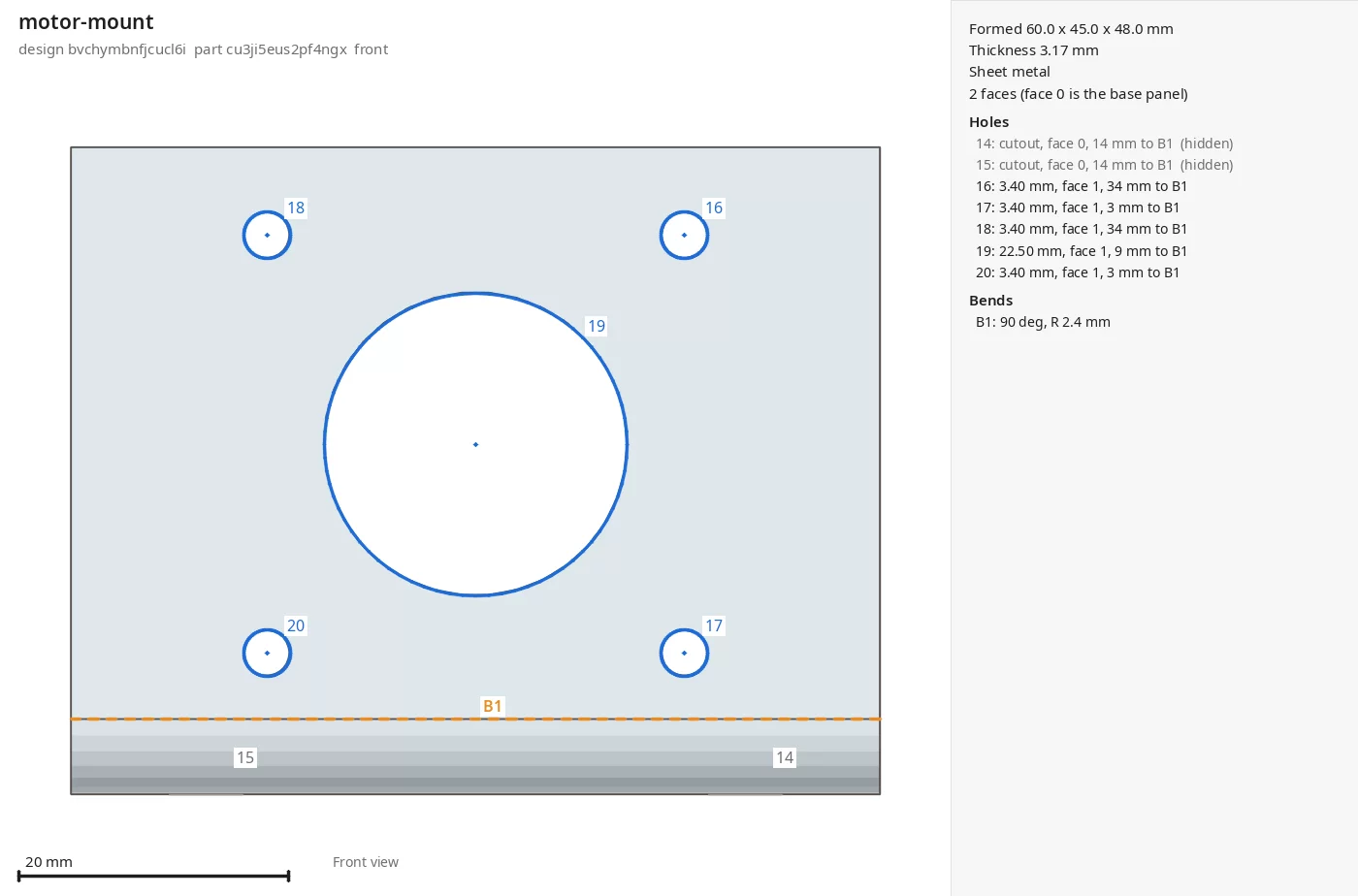
Two things are worth noticing. The agent did not quietly pick a different finish when deburring was unavailable. It asked. And it did not accept the bend risk for us. Both are rules in the agent guide, and both are why you can trust what it reports.
Step 5: Fix what the check found
Because the design is a script, the fix is small. The agent raised the motor face and the shaft height by a few millimetres, exported the file again, and uploaded it.
I changed two variables in the script (motor face height 48 → 56 mm, shaft height 26 → 33 mm), exported, and uploaded the new file. The lower holes are now 10.2 mm from the bend. Quote status: ready, with no findings.
5052-H32 aluminum, 0.125 in, tumbled:
- 4 pieces: $25.44 ($6.36 each)
- 10 pieces: $57.20 ($5.72 each)
- 25 pieces: $140.75 ($5.63 each)
Standard production is 8 business days. Expedited is 6 business days for a $50.00 surcharge. One thing to decide: 4 pieces is $6.56 under RMFG's $32.00 order minimum, so that cart could not be paid. 10 pieces clears it.
Make it 10. Standard production, ground shipping.
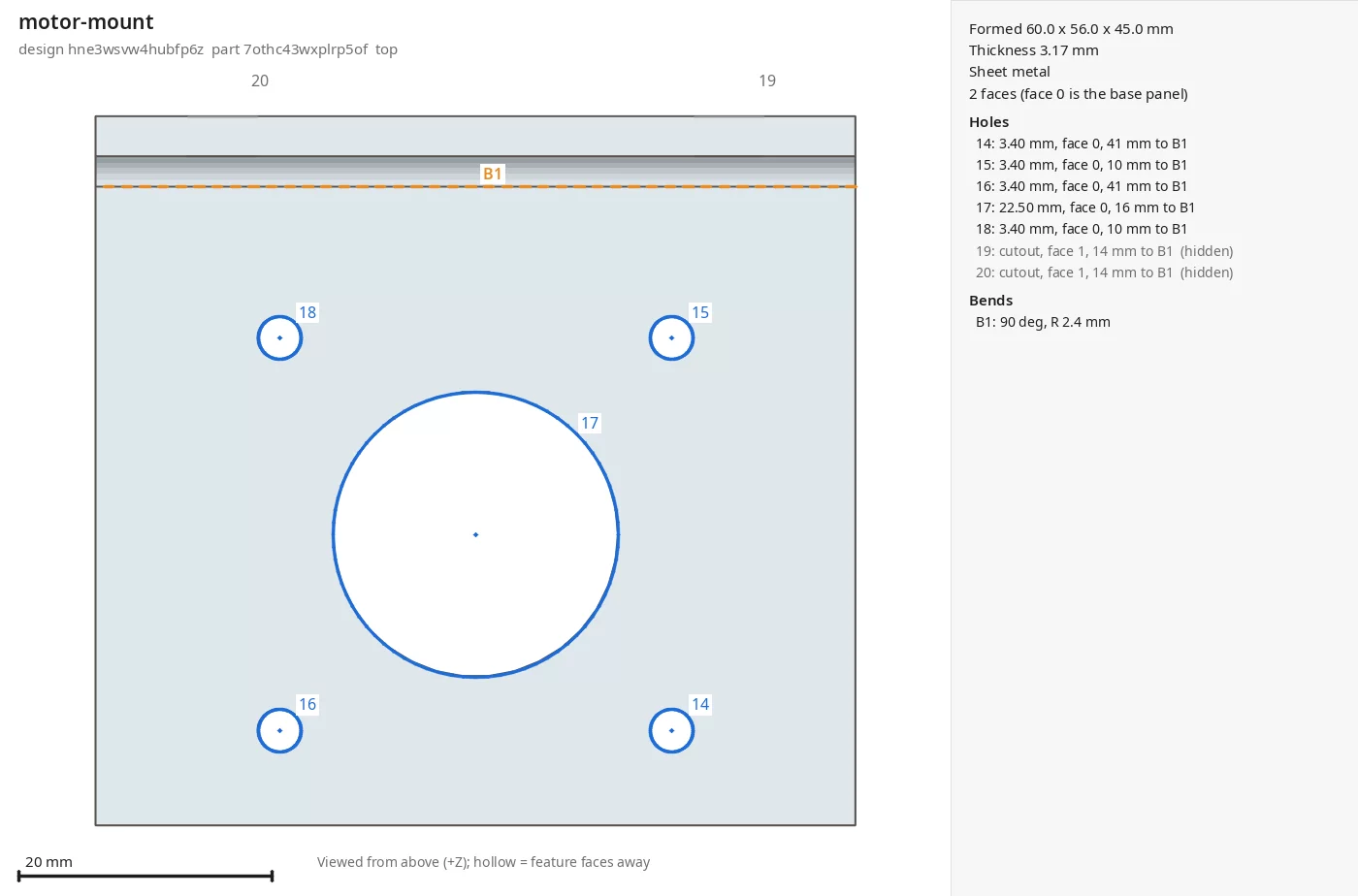
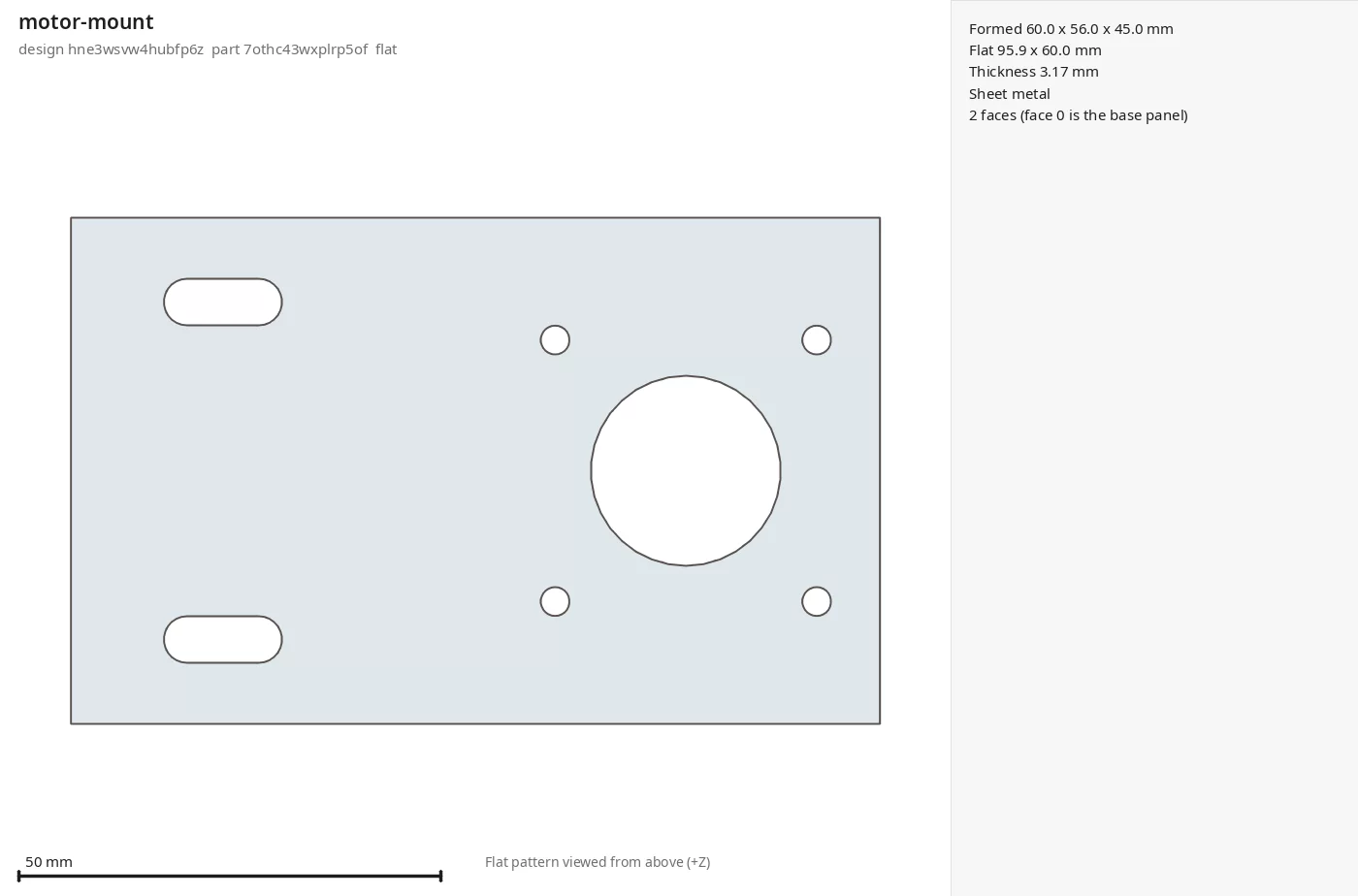
The prices from that quote, in 5052-H32 aluminum, 0.125 in thick, tumbled:
| Quantity | Each | Total |
|---|---|---|
| 4 | $6.36 | $25.44 |
| 10 | $5.72 | $57.20 |
| 25 | $5.63 | $140.75 |
These are the prices our quote returned for this part when we wrote the guide. Your part gets its own price, and quotes do not include sales tax.
Step 6: Choose delivery and check out
The agent prices delivery to your address, with standard and expedited production side by side. Then it prepares a cart and gives you a single link.
Your cart is ready: 10 × motor-mount in 5052-H32 aluminum, 0.125 in, tumbled. Parts are $57.20 and ground shipping to Austin is included. Sales tax is added at checkout.
Review and pay here: https://rmfg.com/cart?cart=…
Nothing is ordered until you pay on that page. If you are not ready, sign in there and save the parts to your account.
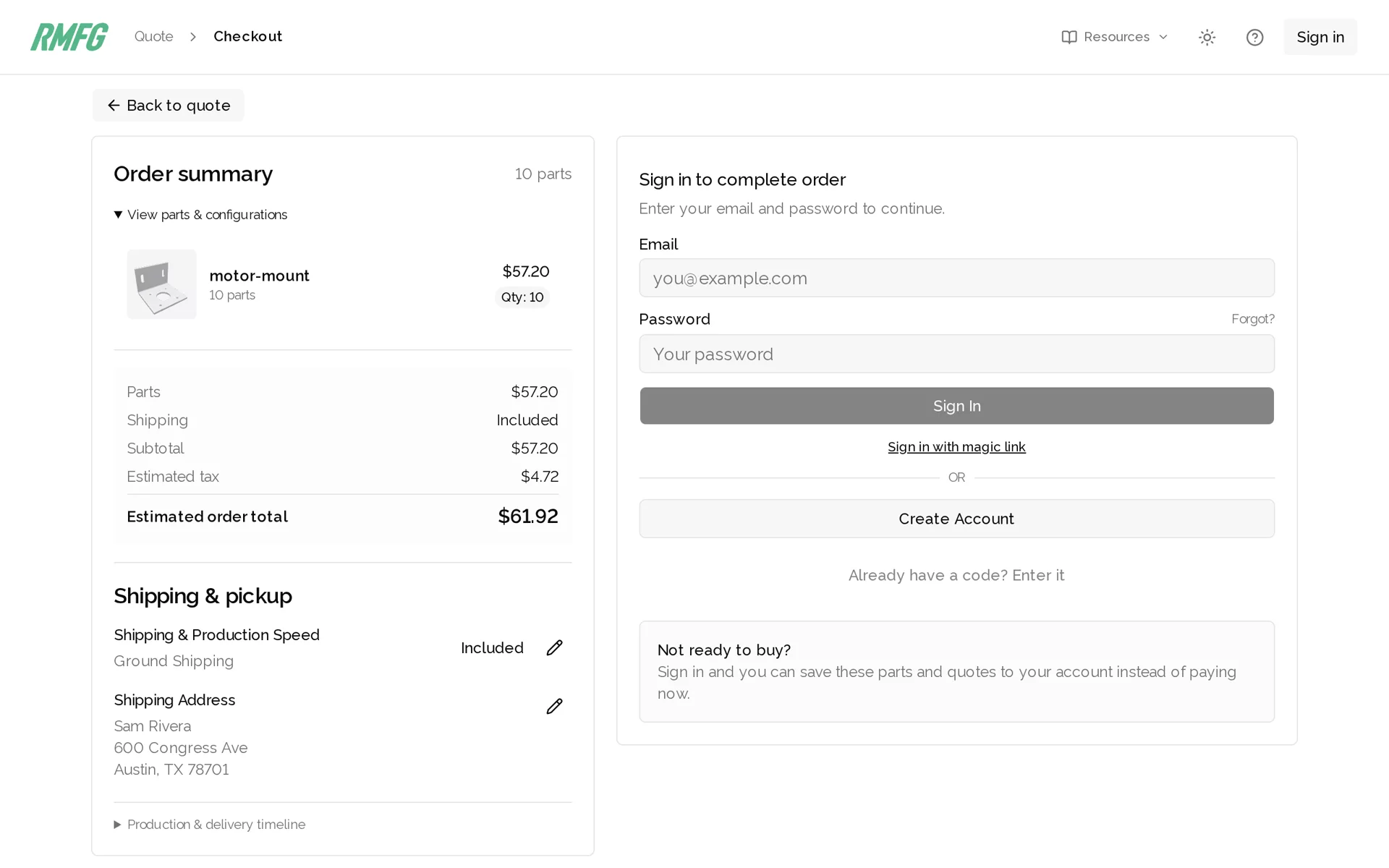
Open the link, check the parts and the address, sign in or create an account, and pay. That is the first moment you need an RMFG account. If you are not ready to buy, sign in on the same page and save the parts to your account instead.
After you pay, the agent can confirm the order number. Connect it to your account and it can also tell you the order's status, ship date, and tracking number whenever you ask.
No agent? Upload the file yourself
You do not need an agent to order an AI-designed part. If a chat model gave you a STEP file, or a script that makes one, the quote page does the rest. This recording shows the same motor mount going from upload to a price.
- Go to rmfg.com/quote/sheet and drop in the STEP file.
- Choose the material. The thickness is matched to your model, and a recommended finish is filled in.
- Add tapped holes, countersinks, hardware, or welds if the part needs them.
- Set the quantity and read the price. Options a part cannot have are greyed out with the reason.
- Enter your address, pick a delivery option, and check out.
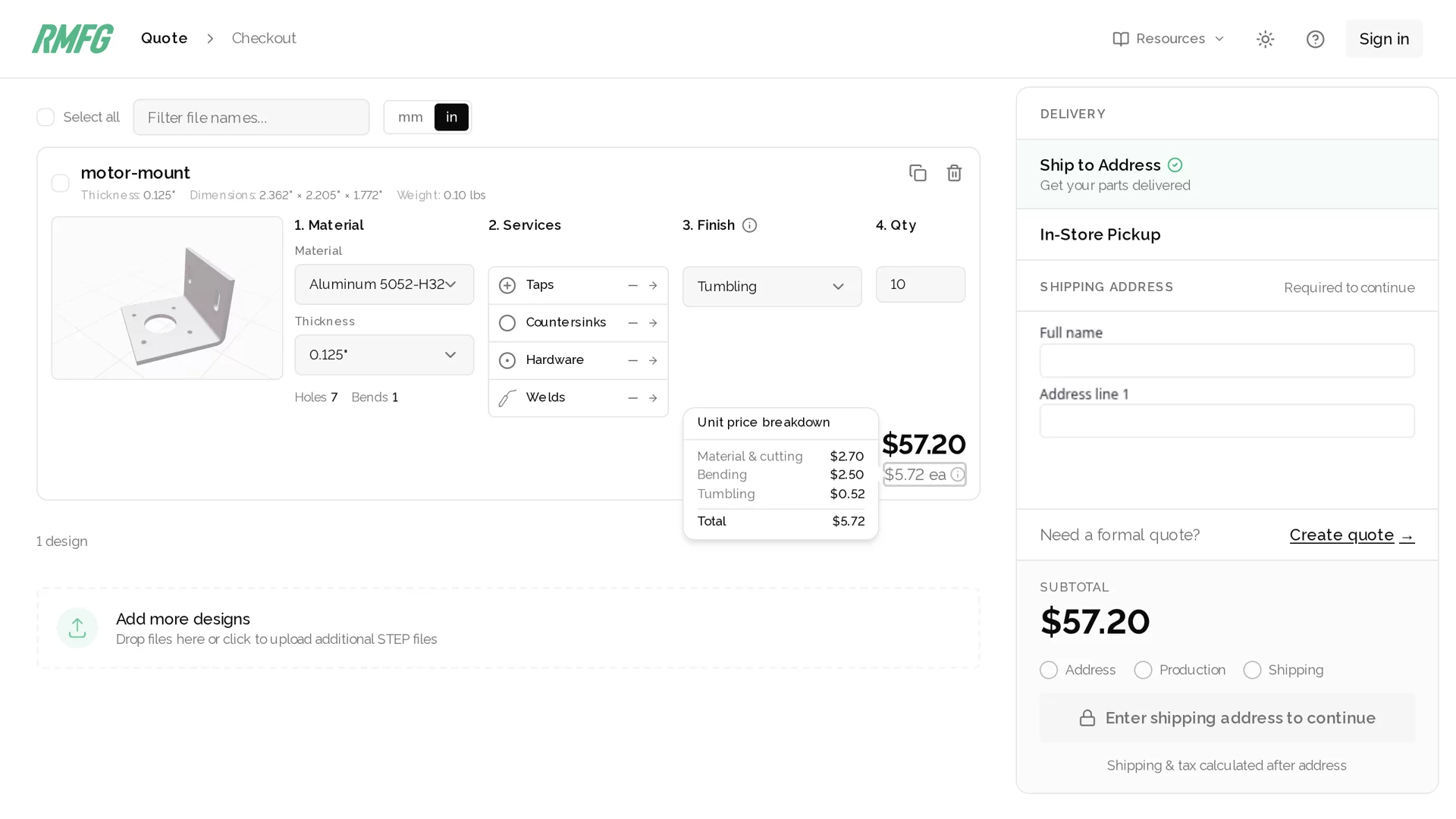
If the quote flags something, paste the message back to the AI that wrote the part and ask it to change the script. It is the same loop as step 5, with you carrying the messages.
More prompts to copy
These work with any agent connected to RMFG. Change the part, material, and quantities to suit.
Fix every blocking finding from the RMFG quote by changing the CAD script, not by accepting the risk. Change as few dimensions as you can, export the STEP file again, upload it, and quote it again.

Then show me what you changed, the new distances, and the new price.Quote this part at RMFG in 5052 aluminum, cold rolled steel, and 304 stainless steel, each at the stocked thickness closest to 3 mm.
Give me a table with the unit price at 10 and 50 pieces, any findings for each material, and the production time.Show me a labeled preview of the part so I can pick holes by number. Then tap the four motor screw holes M3 × 0.5 if RMFG's tap catalog allows it at this thickness. If it doesn't, show me the closest options and ask.
Quote 10 pieces and tell me what tapping adds to the price and the production time.Add matte black powder coat to this part at RMFG. Check the hanging hole and minimum thickness rules first and tell me if the design needs a change.
Then quote 10 pieces and tell me what the coating adds to the price and the production time.Check on my RMFG orders. For each open order, tell me its status, whether it is expedited, the estimated ship date, and tracking if it has shipped.You can't add MCP servers, so use RMFG's REST API with curl instead. Read https://www.rmfg.com/docs/api/agent-projects.md and follow it: start a project with no signup, upload my STEP file, quote it, and create a cart.
Show me every manufacturing finding and the price. Give me cart_url and no other link. Do not say an order was placed.Why RMFG is easy for AI-designed parts
- The rules are published for machines. One plain-text file, generated from the checks we run, lists every limit and every catalog item. The AI can design to our factory instead of guessing.
- No signup to get a price. An agent starts a project and quotes without an account, an API key, or a sales call.
- A real manufacturability check, right away. Every upload is unfolded and checked against the tooling that will make it. Findings point at a specific hole or bend and give the number to hit.
- Pictures the agent can see. Labeled previews and flat patterns come back as images, so you and the agent are looking at the same hole 17.
- Instant prices. Material, finish, and quantity changes are priced on the spot. Compare three quantities in one request.
- One link to check out. The agent cannot pay. You get a cart with everything filled in and approve it yourself.
- Made in one factory. We cut, bend, tap, weld, and powder coat in Fort Worth, Texas, and ship across the continental US. Ordinary ground shipping is included in the price.
Common problems with AI-generated CAD
| What you see | What to tell the AI |
|---|---|
| It gives you an STL or a picture | "Write a CadQuery script and export a STEP file." |
| The part cannot be analyzed as sheet metal | "Model it as one solid with constant thickness and a radius on every bend." |
| The thickness has no matching stock | "Use a thickness from RMFG's materials catalog." A near miss gets a notice, not a rejection |
| Holes are too close to a bend | "Move the holes at least 2 × thickness + bend radius from the bend," or accept the risk |
| A hole or slot is too small | "Make every cutout at least half the material thickness wide." |
| The finish you want is greyed out | Ask the agent which finishes the part qualifies for. Small parts can be tumbled when they are too small to deburr |
| The cart is under the $32 minimum | Raise the quantity. The agent tells you how far short it is |
| The part shows up with a strange name | "Name the part when you export the STEP file." |
FAQs
Can I order a sheet metal part that an AI designed? Yes. RMFG quotes from a STEP file and does not care who or what drew it. Upload the file at rmfg.com/quote/sheet, or let an AI agent upload it through RMFG's MCP server at https://api.rmfg.com/mcp. Every part gets the same manufacturability check and instant price.
What file does the AI need to give me? A STEP file (.step or .stp), up to 50 MB, with the part modeled as a solid at its finished shape: constant thickness, bends included. Ask the AI for a CadQuery or build123d script that exports STEP. Mesh files such as STL do not carry the faces and bends RMFG needs to quote sheet metal.
Which AI tools can order from RMFG? Any client that supports remote MCP servers: Claude (claude.ai, Claude Desktop, and Claude Code), ChatGPT developer mode, Cursor, VS Code with GitHub Copilot, and Codex. Agents that cannot add MCP servers can use the REST API, which also starts without a signup.
Do I need an RMFG account or an API key to get a quote? No. The agent calls begin_project and can upload, check, quote, and prepare a cart with no account and no key. You sign in or create an account on the checkout link when you pay or save the parts.
Can the AI place the order and pay for it? No. There is no payment tool. The agent prepares a cart and gives you one link. Nothing is ordered until you review that cart and pay on rmfg.com.
How does the AI know what RMFG can make? RMFG publishes its manufacturing rules at https://www.rmfg.com/docs/manufacturing-rules.txt. The file is generated from the checks the quote runs and from the live material, finish, and hardware catalogs. An agent can read it before designing, with no account.
What happens when the AI's design breaks a rule? The quote comes back blocked, with each finding tied to a part, hole, or bend and the limit it missed. The agent can change the CAD script and upload again. A few findings, such as a hole close to a bend, are risks you can choose to accept instead.
Is there a minimum order? There is no minimum quantity, so you can order one part. An order must total at least $32.00 before sales tax, including shipping.
How long does an AI-designed part take to make? The same as any other part. When this guide was written, flat laser-cut sheet parts took 5 business days and bending added 3. Expedited production is available for a surcharge. The quote shows ship dates for your design.
What can RMFG make from an AI-generated design? Laser-cut sheet metal and tube in aluminum, steel, and stainless steel, with press brake bending, tapping, countersinks, PEM hardware, welding, and powder coating. Parts are made in Fort Worth, Texas and ship across the continental US.
Start with your own part
Paste the design prompt into your AI, swap in your part, and connect your agent. Or upload a STEP file and see the price yourself.